
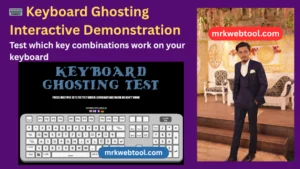
⌨️ Keyboard Ghosting Interactive Demonstration
Test which key combinations work simultaneously on your keyboard. Find your hardware limitations and anti-ghosting capabilities in real-time.
What is Keyboard Ghosting?
Keyboard ghosting occurs when you press multiple keys simultaneously on a standard keyboard, and some of the keystrokes fail to register on your computer. This happens due to the grid-pattern hardware limitations found within most membrane office keyboards.
How to Use This Tester
Click the Start Demo button above, then hold down multiple key combinations (such as W, A, S, D or key groups used in gaming). If some keys turn bright neon red on our matrix layout while others fail to light up entirely while being held, you are seeing keyboard ghosting limitations in real time.
How to Use the Keyboard Ghosting Test Tool on MRKWebTool
Welcome to the ultimate guide on testing your keyboard’s performance! Agar aap ek gamer, programmer, ya typist hain, toh yeh tool aapke keyboard ki hardware limits ko check karne ke liye behtareen hai. Is tool ko bina kisi dikkat ke use karne ke liye neeche diye gaye steps ko follow karein.
🚀 Step-by-Step Guide: How to Use the Tool
🖱️ Step 1: Start the Demo
Sabse pehle page par diye gaye “Click to Start Demo” button par click karein. Ispar click karte hi hamara core script active ho jayega aur aapke real-time keyboard inputs ko capture karna shuru kar dega.
⌨️ Step 2: Press Multiple Keys (Key Combinations)
Apne keyboard par ek saath multiple keys ko press karke hold (daba kar) rakhein. Aap gaming combinations jaise W + A + S + D + Shift ya koi bhi random combinations test kar sakte hain.
👀 Step 3: Watch Live Highlight
Jo bhi keys aapka hardware accurately detect karega, woh screen par bane virtual keyboard layout me Neon Red color me highlight ho jayengi. Agar koi key dabaane par bhi highlight nahi hoti, toh samajh lijiye wahan ghosting ho rahi hai.
📊 Step 4: Check Key Count & Max Rollover
Tool ke upar aapko do scoreboard counters dikhenge:
-
Active Keys Pressed: Real-time me aapne is waqt kitni keys hold ki hain.
-
Max Rollover Detected: Aapke keyboard ne ab tak ek saath maximum kitni keys register ki hain. Zyada count ka matlab hai better hardware!
✍️ Step 5: View Typed Text Stream
Keyboard matrix ke thik neeche “Real-Time Text Stream Output” box diya gaya hai. Jo bhi keys aap type kar rahe hain, unka actual character output yahan print hota rahega taaki aap verification kar sakein.
🧠 What Is Keyboard Ghosting? (Deep Dive)
Keyboard ghosting ek aisi hardware-level limitation hai jo aksar older ya low-cost membrane keyboards me dekhne ko milti hai.
Simple Words Me: Jab aap ek saath 3 ya usse zyada keys press karte ho, aur computer unmein se kuch keys ko register ya detect nahi kar pata, toh use Keyboard Ghosting kehte hain.
Aap physical button toh daba rahe hote hain, lekin computer tak uska signal nahi pahunchta. Yeh problem gaming ya fast typing ke dauran kaafi frustrating sabit ho sakti hai.
🔍 Why Keyboard Ghosting Happens
Har regular keyboard ke andar ek single plastic sheet ya circuit matrix hota hai jo rows aur columns ke pattern par chalta hai.
Jab aap ek hi row ya column ke multiple keys ko ek saath press karte ho, toh standard internal circuit confused ho jata hai aur current pathways block ho jaate hain. Is grid limitation ki wajah se kuch keys bilkul ignore ho jaati hain ya phir galat key trigger ho jaati hai. Is dikkat ko door karne ke liye hi premium keyboards me Anti-Ghosting aur NKRO feature diya jata hai.
⚡ What Is Anti-Ghosting & NKRO?
Agar aap market me naya keyboard lene ja rahe hain, toh aapko ye do terms zaroor pata honi chahiye:
-
Anti-Ghosting: Yeh ek aisi technology hai jo keyboard ke specific zones (jaise gaming keys WASD, Space, Shift) ko is tarah optimize karti hai ki woh ek saath press hone par bhi accurately register ho sakein.
-
NKRO (N-Key Rollover): Yeh keyboard engineering ka gold standard hai. ‘N’ ka matlab hota hai unlimited. Full NKRO support wale keyboards hardware level par aapki saari keys (chahe aap saari 104 keys ek saath daba dein) ko bina kisi error ke register kar sakte hain. High-end mechanical keyboards me hamesha NKRO milta hai.
🎮 Why Gamers & Professionals Care About Ghosting
Gaming ke dauran ek single missed keypress aapko poora match hara sakti hai.
Imagine kariye aap ek competitive FPS game (jaise Valorant ya CS:GO) khel rahe hain aur aapko ek saath diagonal run karne, crouch karne, aur weapon switch karne ke liye W + A + Shift + 3 press karna hai. Agar aapka keyboard ghosting ka shikar hai, toh aapka character ya toh ruk jayega ya action execute nahi karega.
Yahi wajah hai ki esports players, professional programmers, aur fast-content writers hamesha anti-ghosting aur high rollover wale mechanical keyboards ko priority dete hain.
🛠️ Why This Keyboard Ghosting Tool Is Useful
MRKWebTool ka yeh interactive software aapko bina kisi third-party software ya drivers ko install kiye directly browser me real-world diagnostic testing ki facility deta hai.
🌟 Key Benefits of Using This Tool:
-
Live Layout Visualization: Screen par mojud advanced UI layout direct physical keyboard ko map karta hai, jisse test karna asaan ho jata hai.
-
Text Box Verification: Bahut se tools sirf count batate hain, lekin hamara tool aapko input vs output stream check karne ka feature deta hai jo programmers ke liye kafi helpful hai.
-
100% Privacy & Safety: Yeh tool poori tarah se browser-based (client-side JavaScript) hai. Aapka koi bhi data ya keystroke kisi server par sent nahi hota. Aapka privacy data completely safe hai.
-
Cross-Browser Support: Chrome, Edge, Safari, Firefox, aur Opera jaise sabhi modern web-browsers par smoothly kaam karta hai.
❓ Frequently Asked Questions (FAQs)
Q1. What is keyboard ghosting?
Keyboard ghosting tab hota hai jab aap ek saath kai saari keys press karte hain aur internal hardware matrix limit ki wajah se computer unmein se kuch keys ke signals ko drop (ignore) kar deta hai.
Q2. How does this keyboard ghosting test work?
Yeh tool browser ke input API event listeners ka use karta hai. Jab aap “Start Demo” par click karke keys press karte hain, toh script real-time me unke keyCode ko pakad kar screen par highlight karti hai.
Q3. Is this tool safe to use?
Yes, absolutely! Yeh tool completely safe hai. Isme koi backend database connection nahi hai, isliye aap jo bhi type karte hain woh sirf aapke browser screen tak hi rehta hai.
Q4. Can this tool detect N-Key Rollover (NKRO)?
Haan, agar aap apne keyboard ki sabhi fingers se ek saath maximum keys press karenge aur counter upar badhta chala jaye bina kisi key block ke, toh iska matlab aapka keyboard NKRO supported hai.
Q5. Can laptop keyboards have ghosting issues?
Yes, zyadatar standard aur slim laptops (jo gaming laptops nahi hain) unme budget circuitry use hoti hai, isliye unme 3-4 se zyada keys ek saath press karne par ghosting issue dikhta hai.
Q6. Is a mechanical keyboard better for anti-ghosting?
Definitely. Mechanical keyboards ke har ek switch ke neeche individual diode hota hai jo har keypress ko independent signal banata hai. Isliye mechanical keyboards ghosting-free hote hain.
Q7. Is this keyboard ghosting test free?
Yes, mrkwebtool.com par yeh tool har user ke liye 100% free hai aur aap ise unlimited times use kar sakte hain.